Event request column descriptions

The columns on the Event request page provide details about each request. You can filter events by Activities, Actions, Dates, Status, Organizations, and Rule Names. You can also sort each columns based on the related parameters.
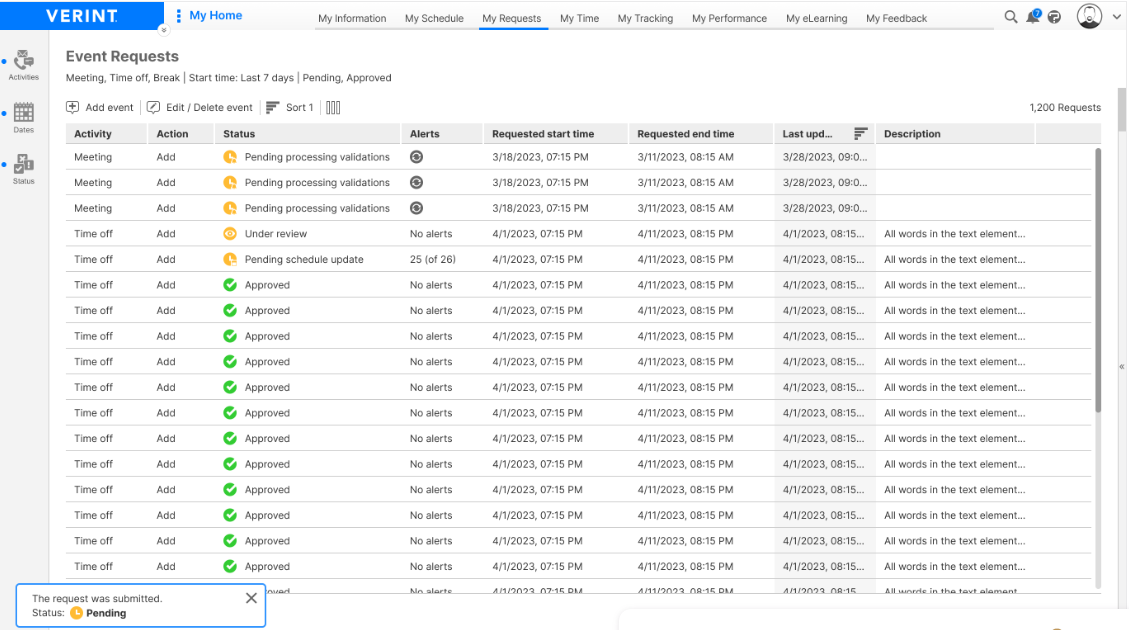
Screenshot of event request columns

Column

Description

Activity

Activity associated with the event.

Action

Action specified in the request:

  • Add: Add a new event

  • Move: Move an existing event to a different time

  • Delete: Delete an existing event

  • Shorten: Shorten the amount of time of an event

  • Extend: Lengthen the amount of time of an event

Status

Current status of the request:

  • Pending: Request submitted by employee and awaiting manager approval.

  • Pending processing alerts: Request has been submitted, and validations are being processed.

    Agents can withdraw request before it is processed by the manager.

    Managers can also process the requests at this stage.

  • Pending with new alerts: If any of the validations of a request have a different outcome from the status it had at the time of request submission, the system will not proceed to approval and schedule update. Once all the validations are processed the status of the request changes to “Pending with new alerts”.

  • Under review: At this stage, the validations associated with the request will be reprocessed.

  • Approved: Request approved by manager.

  • Denied: Request denied by manager.

  • Withdrawn: Request withdrawn by submitter.

  • Invalid: Request is no longer valid because it fails to meet specific validation criteria or rules, resulting in the request being marked as invalid and not processed.

Expired requests cannot be approved by managers.

You can filter by various statuses of the request.

Alerts

Displays the number of alerts for a request. If the validations are being processed, then a processing icon Screenshot of alert validation processing is shown.

Requested start time

Requested start date and time of the event.

Requested end time

Requested end date and time of the event.

Last updated

Last date and time the request was updated.

Description

Text that the user enters when submitting a request.

View event requests

View event request details

Validations tab description